7 Best Akiflow Alternatives in 2026 (Features and Pricing)

Chris Raroque

The market for productivity apps has exploded in the past few years, with an influx of applications allowing users to combine their to-do lists and calendars into one unified workspace. This hybrid approach is incredibly convenient because users can jot down tasks like they normally do in a to-do list app and then drag them into the calendar to “time block” their day—a technique that has been proven to boost productivity and focus.
Akiflow was one of the early leaders in this space, offering a time-blocking platform that lets you import tasks from other tools and add them to your calendar. However, with its high price and a phone app that leaves rituals and the focus timer to the desktop, many users have been searching for alternatives that better fit their needs and budgets.
In this comprehensive 2026 guide, we’ll break down the pros and cons of Akiflow, compare seven of the best alternatives, and help you find the perfect tool for managing your time and tasks.
Why Akiflow Might Not Be for You in 2026
While Akiflow has built a solid reputation for its robust feature set and impressive integrations with popular productivity tools, there are several reasons why it might not be the right choice for everyone.

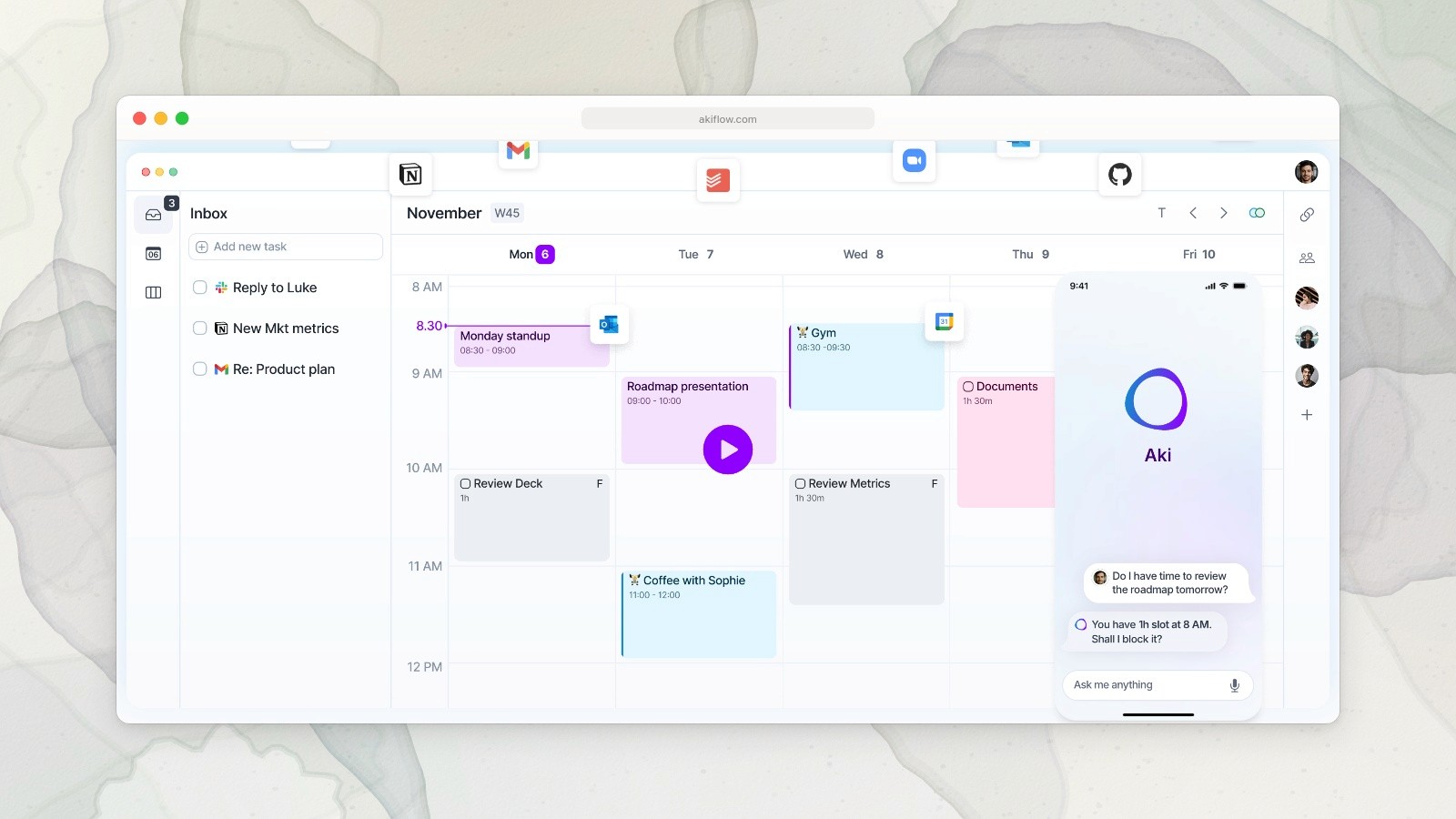
Akiflow’s calendar, task inbox and Aki assistant.
Akiflow Pricing and Drawbacks
Pricing:
Pro: $34/mo, or $19/mo billed yearly
Yearly: $228/year ($19/mo)
No free plan available
One of the biggest drawbacks of Akiflow is its price. At $34/month, or $19/month billed yearly, it’s particularly steep for personal users, students, and anyone who wants to experiment with time-blocking before making a long-term investment.
Key limitations:
Planning rituals and the focus timer only run on desktop
Expensive for individual users compared with most alternatives
Steep learning curve for new users
You need a computer to create an account
Akiflow does have iPhone and Android apps, but they lean on the desktop: you sign up on a computer, and the planning rituals and focus timer stay there. If you plan your day from your phone, that’s a real limit.
7 Best Akiflow Alternatives for 2026
1. Ellie – Best Overall Daily Planner
Ellie is a beautifully designed daily planning app specifically built for people who want to manage their daily schedule with elegance and simplicity. What sets Ellie apart is its focus on creating an intuitive experience that works seamlessly across both web and mobile platforms.
Key features:
Full iPhone and iPad apps for planning on the go
Unique Kanban view for visualizing and planning your week
Brain dump feature for quick task capture
Interactive calendar for time blocking
Google, Outlook and Apple calendar integrations that keep tasks separate from events
Task labels and filters for staying focused
Recurring tasks for daily routines and habits
Subtasks for breaking down complex projects
Light and dark mode
Daily planning and shutdown on desktop and iPhone
Why choose Ellie:
Less than half the price of Akiflow, with a 7-day free trial
One-time lifetime purchase option for people who prefer not to subscribe
Exceptional mobile experience for on-the-go planning
Student, teacher and non-profit discounts available
Privacy-focused: Ellie doesn’t sell your data or run ads
Ellie pricing 2026:
7-day free trial on monthly and yearly plans
Pro subscription: $9.99/mo or $99.99/year
Lifetime access: $299.99 (one-time payment)
50% off any plan for students, teachers and non-profits
2. Sunsama – Best for Ritual-Based Daily Planning
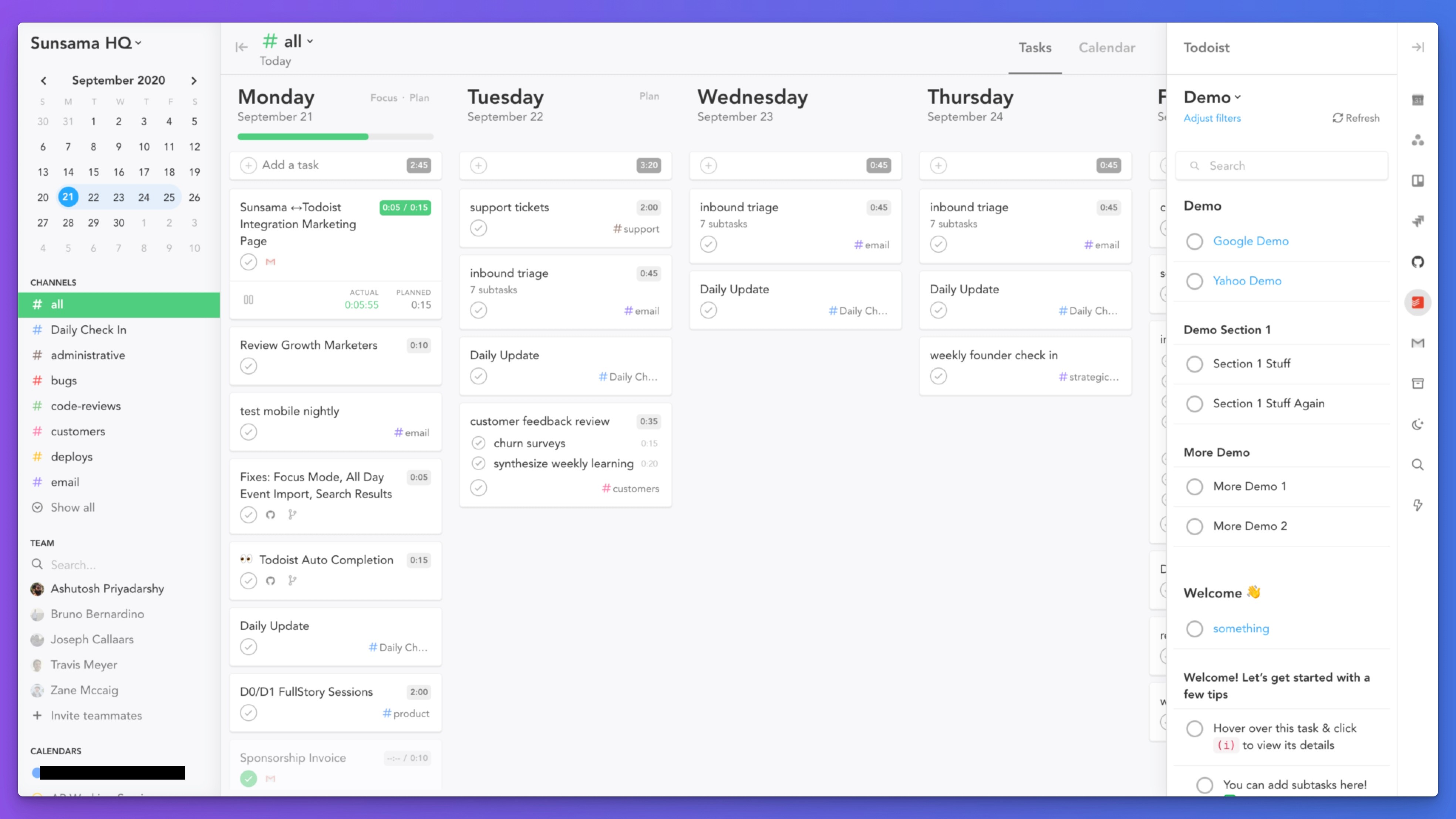
Sunsama is one of the most established and popular apps in the task management and calendar integration space. The platform excels at helping users establish daily planning rituals through guided workflows and deep integrations with other productivity tools.
Key features:
Import tasks from Google Tasks, Todoist, Asana, Jira, and Trello
Calendar sync with Google Calendar, Outlook, and Apple Calendar
Guided daily planning rituals and workflows
Meeting detection and smart scheduling
Team collaboration features
Focus mode to minimize distractions
Best for: Teams and individuals who want structured daily planning routines with strong integration capabilities
Sunsama pricing 2026:
Individual: $22/mo, or $17/mo billed yearly
Team: Custom pricing
No free plan
3. Motion – Best AI-Powered Planning
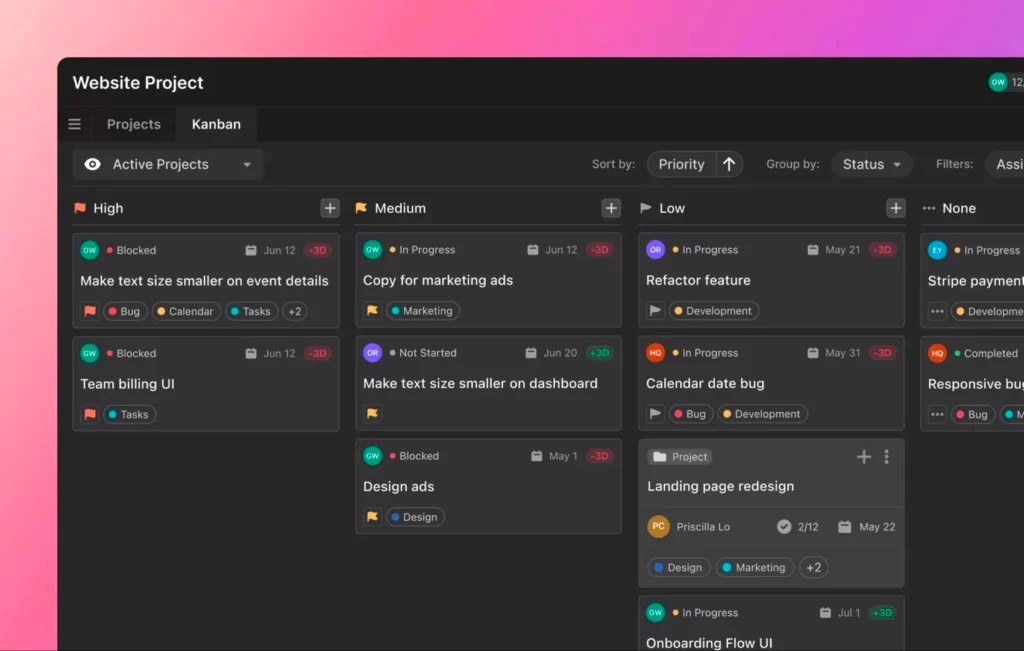
Motion is the most advanced AI-powered daily planning app on the market, using artificial intelligence to intelligently schedule your tasks and manage your calendar. It goes beyond simple task management by offering project management capabilities and team features.
Key features:
AI-powered intelligent calendar that auto-schedules tasks
Project management with AI assistance
Automated task scheduling based on priorities and deadlines
Scheduling links for booking meetings
Team collaboration and project tracking
Smart deadline management
Natural language processing for quick task entry
Best for: Power users and teams who embrace AI-driven productivity and want to replace multiple tools
Motion pricing 2026:
Individuals: $29–$69/mo depending on plan and billing
Teams: $19–$49 per seat per month
4. Todoist – Best for Task Management Flexibility
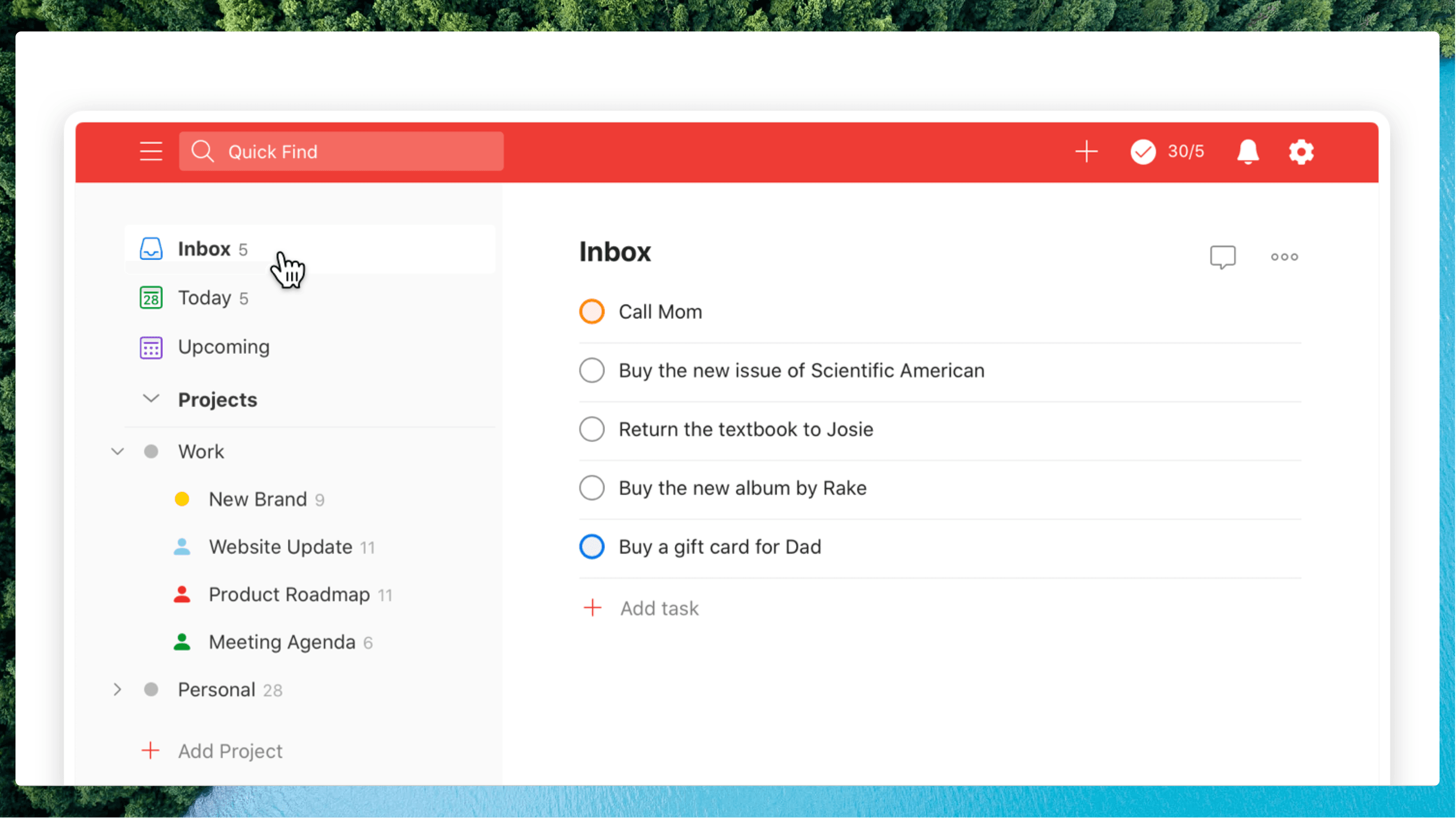
Todoist added time blocking in 2024, and it remains one of the most powerful and flexible task management platforms available. Its ability to integrate with nearly every productivity tool, combined with its polished mobile experience, makes it an excellent choice for many users.
Key features:
Lightning-fast quick capture with multiple input methods
Powerful filtering and sorting capabilities
Subtasks and section organization
Recurring tasks and smart scheduling
Integrations with 200+ apps
Collaboration features for teams
Productivity tracking and analytics
Available on all major platforms (iOS, Android, web, desktop)
Best for: Users who want a pure task management solution with excellent mobile support and extensive integrations
Todoist pricing 2026:
Free: Up to 5 active projects
Pro: $7/mo, or $60/year
Business: $10/mo per user (for teams)
5. Routine – Best for Daily Habit Tracking
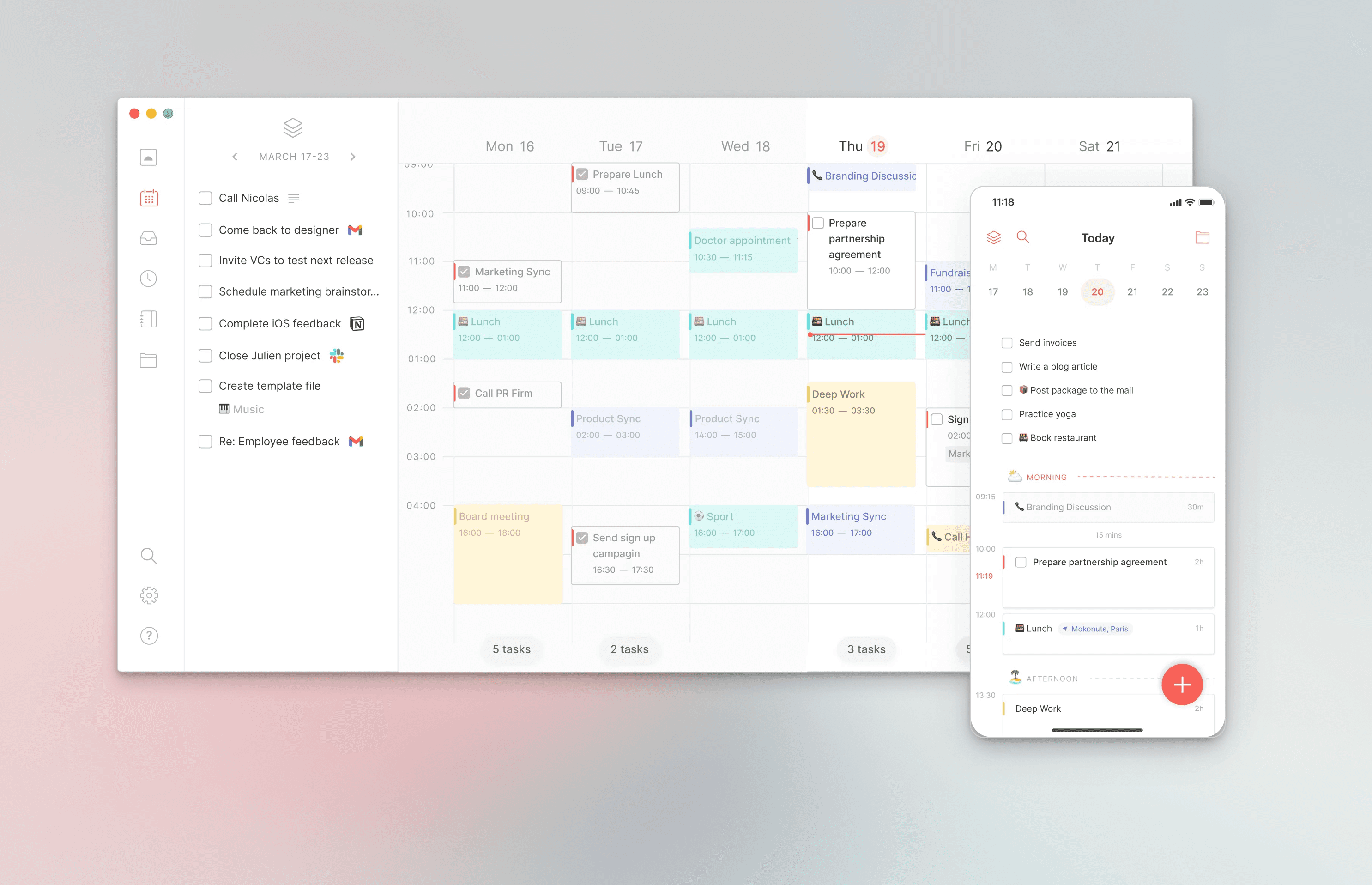
Routine (routine.co) is a ground-breaking daily planner that goes beyond simple task management by emphasizing daily habits, routines, and sustainable productivity practices. It’s designed for people who want to build consistent habits while managing their daily tasks.
Key features:
Habit tracking and streak management
Daily planning with integrated calendar view
Notion and Slack integrations
Beautiful, user-friendly interface
Focus mode to eliminate distractions
Progress tracking and analytics
Best for: People focused on building daily habits and establishing consistent routines
Routine pricing 2026:
Free plan available
Premium: $10-$15/mo
6. Morgen – Best for Multi-Calendar Management
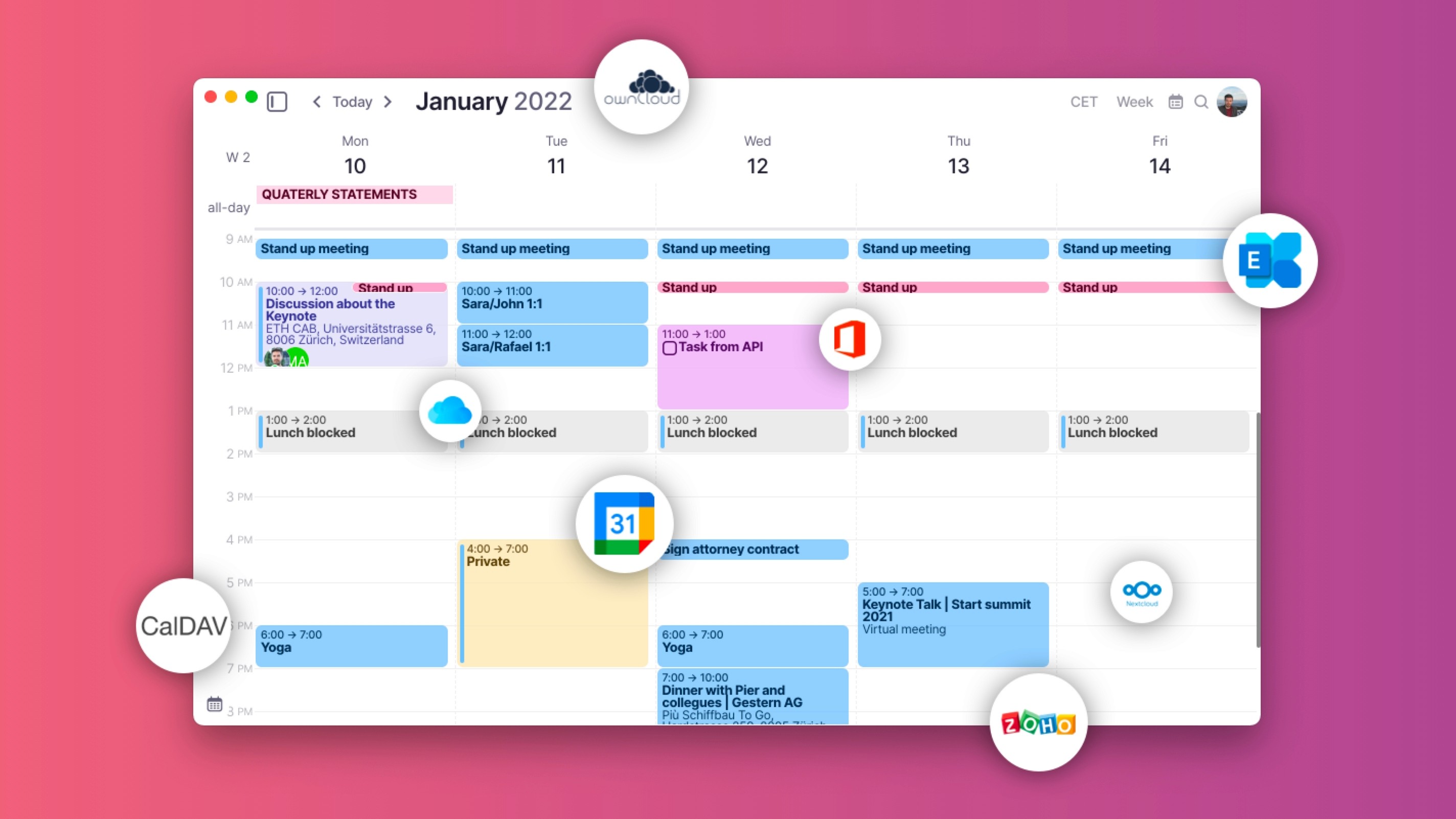
Morgen is a relatively new player in the productivity space that excels at unifying multiple calendars and providing scheduling capabilities. Unlike Akiflow, Morgen offers both free and paid tiers, making it accessible to a wider range of users.
Key features:
Unified calendar view syncing Google Calendar and Outlook simultaneously
Task management integrated with calendar
Scheduling links for meeting bookings
Cross-platform availability (Windows, Mac, Linux, iOS, Android)
Calendar analytics and insights
Team calendar management
Best for: Users managing multiple calendar accounts and needing scheduling links without premium pricing
Morgen pricing 2026:
Free: Basic calendar sync with 1 account
Personal: €15/mo (approximately $16-17 USD)
Pro: €25/mo for unlimited calendars and integrations
7. Reclaim – Best for Productivity Analytics
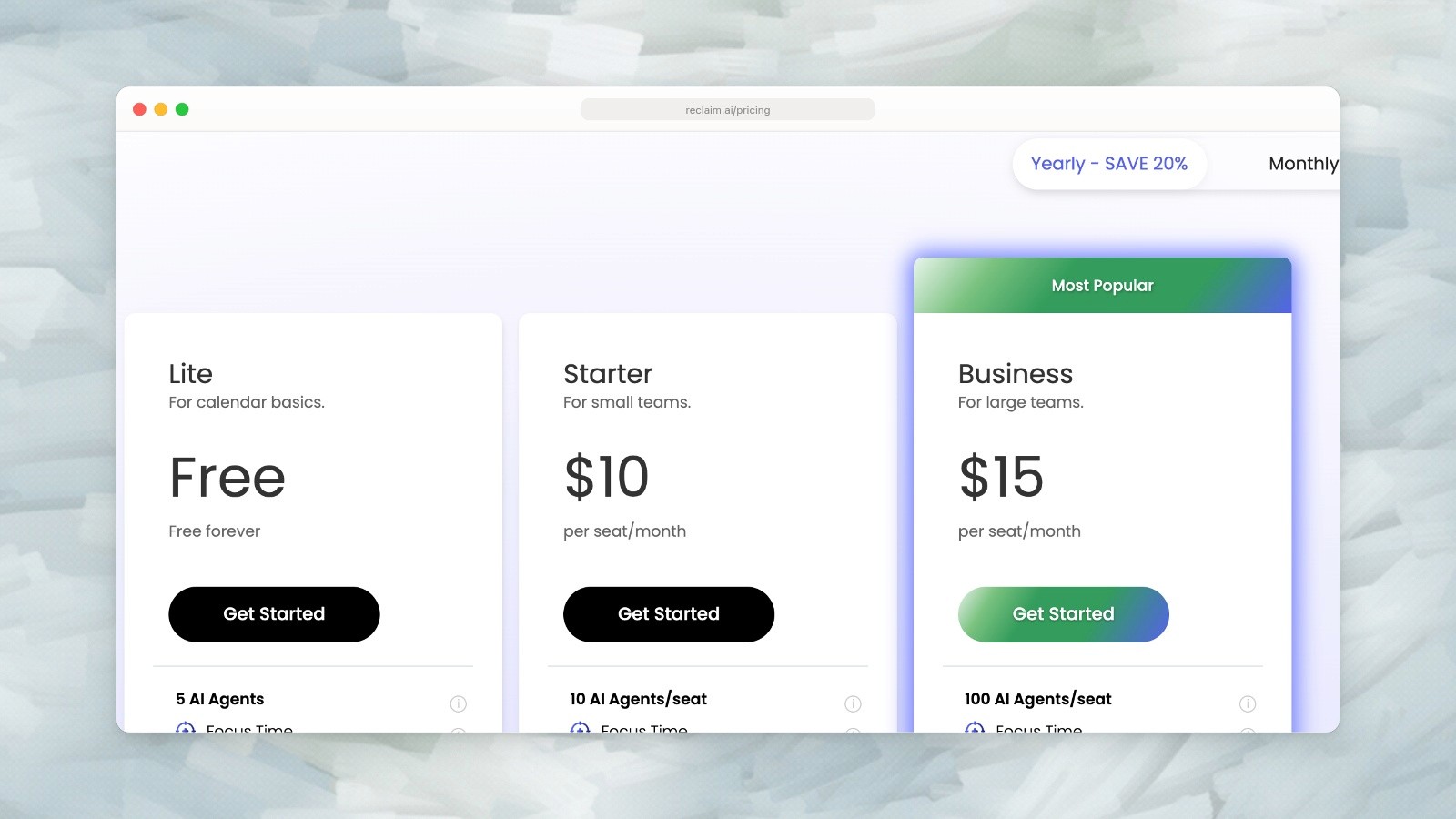
Reclaim pricing: Lite is free; Starter is $10 and Business is $15 per seat per month.
Reclaim is an intelligent calendar app that automatically schedules your tasks and focus blocks based on your calendar availability. It uses smart algorithms to optimize your time and provide actionable productivity insights.
Key features:
Automatic task scheduling on your calendar
Focus time blocks to protect deep work
Smart conflict resolution
Calendar analytics and insights
Integration with popular task management tools
Team calendar sharing and visibility
Best for: Users who want intelligent task scheduling with detailed productivity analytics
Reclaim pricing 2026:
Lite: Free
Starter: $10/mo per seat
Business: $15/mo per seat
Comparison Table: Features and Pricing
App | Starting Price | Free Plan | Mobile App | Time Blocking | AI Features | Integrations |
|---|---|---|---|---|---|---|
Ellie | $8.33/mo | No (7-day trial) | Excellent | Yes | Yes | Google, Outlook, Apple, Todoist, Notion |
Sunsama | $17/mo | No | Good | Yes | Basic | 20+ apps |
Motion | $19/mo | No | Good | Yes | Advanced | 20+ apps |
Todoist | Free | Yes | Excellent | Yes | Basic | 200+ apps |
Routine | Free | Yes | Good | Yes | No | Notion, Slack |
Morgen | Free | Yes | Good | Yes | No | Multiple calendars |
Reclaim | Free | Yes | Good | Yes | Basic | 10+ apps |
Quick Buying Guide
Best free alternative to Akiflow:
Todoist - Generous free plan; time blocking is part of Pro
Morgen - Free plan with multi-calendar support
Most affordable alternatives:
Todoist Pro - $7/mo (best value for pure task management)
Reclaim - $10/mo (intelligent scheduling at a great price)
Routine - $10-15/mo (habit tracking + planning)
Ellie - $9.99/mo or $99.99/year, with a 7-day free trial (best mobile experience)
Best for team collaboration:
Motion - Advanced project management with AI
Sunsama - Team planning rituals
Todoist - Extensive team features and integrations
Best for AI-powered scheduling:
Motion - Most advanced AI features for intelligent scheduling
Reclaim - Smart task scheduling at a lower price point
Why Ellie is the Best Overall Akiflow Alternative
After comparing seven leading alternatives, Ellie stands out as the best overall replacement for Akiflow. Here’s why:
Superior Mobile Experience: Ellie’s iPhone and iPad apps are full planners: you can sign up, plan your day, run a focus timer and wrap up your day from your phone. In Akiflow, the planning rituals and focus timer only run on desktop.
Flexible Pricing: Ellie offers monthly ($9.99) and yearly ($99.99) plans with a 7-day free trial, plus a one-time lifetime purchase option for $299.99. That’s less than half of what Akiflow charges, and you can pick the plan that fits your budget.
Unique Kanban View: The Kanban view provides an intuitive way to visualize your week and plan tasks across multiple days. This approach is more visual and engaging than traditional list-based task managers.
Brain Dump Feature: The quick capture brain dump allows you to jot down tasks rapidly without organizing them immediately. This is perfect for capturing ideas throughout your day.
Privacy-Focused: Ellie is built with privacy as a core principle. Your data stays yours: Ellie doesn’t sell your data or run ads.
Polished Design: Every detail of Ellie’s design has been carefully crafted for beauty and usability, making it enjoyable to use multiple times per day.
Strong Calendar Integration: Ellie connects to Google, Outlook and Apple calendars, so you see your tasks alongside your events while keeping them separate.
Getting Started with Ellie
If you’re ready to switch from Akiflow to a better daily planner, Ellie is the perfect choice. With its combination of powerful features, beautiful design, flexible pricing, and exceptional mobile apps, Ellie will help you manage your day more effectively than Akiflow ever could.
Sign up for Ellie today and experience the difference a truly user-centric daily planner can make. Every plan starts with a 7-day free trial, so you can try Brain Dump, Timebox and the calendar before you pay.
Try Ellie free for 7 days and see if it fits the way you plan.
Final Thoughts: 2026 Productivity Landscape
The productivity app market in 2026 is more competitive and feature-rich than ever. While Akiflow remains a solid option for businesses and teams willing to pay a premium, the alternatives listed above provide better value, more flexible pricing, superior mobile experiences, and often more advanced features.
Whether you’re looking for AI-powered scheduling with Motion, the affordability of Todoist, the habit-tracking focus of Routine, or the all-around excellence of Ellie, there’s an Akiflow alternative perfectly suited to your needs and budget. The key is to try a few and find the tool that fits your unique workflow and productivity style.
The best productivity app is the one you’ll actually use consistently, so take advantage of the free trials and plans available to find your perfect match.
The market for productivity apps has exploded in the past few years, with an influx of applications allowing users to combine their to-do lists and calendars into one unified workspace. This hybrid approach is incredibly convenient because users can jot down tasks like they normally do in a to-do list app and then drag them into the calendar to “time block” their day—a technique that has been proven to boost productivity and focus.
Akiflow was one of the early leaders in this space, offering a time-blocking platform that lets you import tasks from other tools and add them to your calendar. However, with its high price and a phone app that leaves rituals and the focus timer to the desktop, many users have been searching for alternatives that better fit their needs and budgets.
In this comprehensive 2026 guide, we’ll break down the pros and cons of Akiflow, compare seven of the best alternatives, and help you find the perfect tool for managing your time and tasks.
Why Akiflow Might Not Be for You in 2026
While Akiflow has built a solid reputation for its robust feature set and impressive integrations with popular productivity tools, there are several reasons why it might not be the right choice for everyone.
Akiflow’s calendar, task inbox and Aki assistant.
Akiflow Pricing and Drawbacks
Pricing:
Pro: $34/mo, or $19/mo billed yearly
Yearly: $228/year ($19/mo)
No free plan available
One of the biggest drawbacks of Akiflow is its price. At $34/month, or $19/month billed yearly, it’s particularly steep for personal users, students, and anyone who wants to experiment with time-blocking before making a long-term investment.
Key limitations:
Planning rituals and the focus timer only run on desktop
Expensive for individual users compared with most alternatives
Steep learning curve for new users
You need a computer to create an account
Akiflow does have iPhone and Android apps, but they lean on the desktop: you sign up on a computer, and the planning rituals and focus timer stay there. If you plan your day from your phone, that’s a real limit.
7 Best Akiflow Alternatives for 2026
1. Ellie – Best Overall Daily Planner
Ellie is a beautifully designed daily planning app specifically built for people who want to manage their daily schedule with elegance and simplicity. What sets Ellie apart is its focus on creating an intuitive experience that works seamlessly across both web and mobile platforms.
Key features:
Full iPhone and iPad apps for planning on the go
Unique Kanban view for visualizing and planning your week
Brain dump feature for quick task capture
Interactive calendar for time blocking
Google, Outlook and Apple calendar integrations that keep tasks separate from events
Task labels and filters for staying focused
Recurring tasks for daily routines and habits
Subtasks for breaking down complex projects
Light and dark mode
Daily planning and shutdown on desktop and iPhone
Why choose Ellie:
Less than half the price of Akiflow, with a 7-day free trial
One-time lifetime purchase option for people who prefer not to subscribe
Exceptional mobile experience for on-the-go planning
Student, teacher and non-profit discounts available
Privacy-focused: Ellie doesn’t sell your data or run ads
Ellie pricing 2026:
7-day free trial on monthly and yearly plans
Pro subscription: $9.99/mo or $99.99/year
Lifetime access: $299.99 (one-time payment)
50% off any plan for students, teachers and non-profits
2. Sunsama – Best for Ritual-Based Daily Planning
Sunsama is one of the most established and popular apps in the task management and calendar integration space. The platform excels at helping users establish daily planning rituals through guided workflows and deep integrations with other productivity tools.
Key features:
Import tasks from Google Tasks, Todoist, Asana, Jira, and Trello
Calendar sync with Google Calendar, Outlook, and Apple Calendar
Guided daily planning rituals and workflows
Meeting detection and smart scheduling
Team collaboration features
Focus mode to minimize distractions
Best for: Teams and individuals who want structured daily planning routines with strong integration capabilities
Sunsama pricing 2026:
Individual: $22/mo, or $17/mo billed yearly
Team: Custom pricing
No free plan
3. Motion – Best AI-Powered Planning
Motion is the most advanced AI-powered daily planning app on the market, using artificial intelligence to intelligently schedule your tasks and manage your calendar. It goes beyond simple task management by offering project management capabilities and team features.
Key features:
AI-powered intelligent calendar that auto-schedules tasks
Project management with AI assistance
Automated task scheduling based on priorities and deadlines
Scheduling links for booking meetings
Team collaboration and project tracking
Smart deadline management
Natural language processing for quick task entry
Best for: Power users and teams who embrace AI-driven productivity and want to replace multiple tools
Motion pricing 2026:
Individuals: $29–$69/mo depending on plan and billing
Teams: $19–$49 per seat per month
4. Todoist – Best for Task Management Flexibility
Todoist added time blocking in 2024, and it remains one of the most powerful and flexible task management platforms available. Its ability to integrate with nearly every productivity tool, combined with its polished mobile experience, makes it an excellent choice for many users.
Key features:
Lightning-fast quick capture with multiple input methods
Powerful filtering and sorting capabilities
Subtasks and section organization
Recurring tasks and smart scheduling
Integrations with 200+ apps
Collaboration features for teams
Productivity tracking and analytics
Available on all major platforms (iOS, Android, web, desktop)
Best for: Users who want a pure task management solution with excellent mobile support and extensive integrations
Todoist pricing 2026:
Free: Up to 5 active projects
Pro: $7/mo, or $60/year
Business: $10/mo per user (for teams)
5. Routine – Best for Daily Habit Tracking
Routine (routine.co) is a ground-breaking daily planner that goes beyond simple task management by emphasizing daily habits, routines, and sustainable productivity practices. It’s designed for people who want to build consistent habits while managing their daily tasks.
Key features:
Habit tracking and streak management
Daily planning with integrated calendar view
Notion and Slack integrations
Beautiful, user-friendly interface
Focus mode to eliminate distractions
Progress tracking and analytics
Best for: People focused on building daily habits and establishing consistent routines
Routine pricing 2026:
Free plan available
Premium: $10-$15/mo
6. Morgen – Best for Multi-Calendar Management
Morgen is a relatively new player in the productivity space that excels at unifying multiple calendars and providing scheduling capabilities. Unlike Akiflow, Morgen offers both free and paid tiers, making it accessible to a wider range of users.
Key features:
Unified calendar view syncing Google Calendar and Outlook simultaneously
Task management integrated with calendar
Scheduling links for meeting bookings
Cross-platform availability (Windows, Mac, Linux, iOS, Android)
Calendar analytics and insights
Team calendar management
Best for: Users managing multiple calendar accounts and needing scheduling links without premium pricing
Morgen pricing 2026:
Free: Basic calendar sync with 1 account
Personal: €15/mo (approximately $16-17 USD)
Pro: €25/mo for unlimited calendars and integrations
7. Reclaim – Best for Productivity Analytics
Reclaim pricing: Lite is free; Starter is $10 and Business is $15 per seat per month.
Reclaim is an intelligent calendar app that automatically schedules your tasks and focus blocks based on your calendar availability. It uses smart algorithms to optimize your time and provide actionable productivity insights.
Key features:
Automatic task scheduling on your calendar
Focus time blocks to protect deep work
Smart conflict resolution
Calendar analytics and insights
Integration with popular task management tools
Team calendar sharing and visibility
Best for: Users who want intelligent task scheduling with detailed productivity analytics
Reclaim pricing 2026:
Lite: Free
Starter: $10/mo per seat
Business: $15/mo per seat
Comparison Table: Features and Pricing
App | Starting Price | Free Plan | Mobile App | Time Blocking | AI Features | Integrations |
|---|---|---|---|---|---|---|
Ellie | $8.33/mo | No (7-day trial) | Excellent | Yes | Yes | Google, Outlook, Apple, Todoist, Notion |
Sunsama | $17/mo | No | Good | Yes | Basic | 20+ apps |
Motion | $19/mo | No | Good | Yes | Advanced | 20+ apps |
Todoist | Free | Yes | Excellent | Yes | Basic | 200+ apps |
Routine | Free | Yes | Good | Yes | No | Notion, Slack |
Morgen | Free | Yes | Good | Yes | No | Multiple calendars |
Reclaim | Free | Yes | Good | Yes | Basic | 10+ apps |
Quick Buying Guide
Best free alternative to Akiflow:
Todoist - Generous free plan; time blocking is part of Pro
Morgen - Free plan with multi-calendar support
Most affordable alternatives:
Todoist Pro - $7/mo (best value for pure task management)
Reclaim - $10/mo (intelligent scheduling at a great price)
Routine - $10-15/mo (habit tracking + planning)
Ellie - $9.99/mo or $99.99/year, with a 7-day free trial (best mobile experience)
Best for team collaboration:
Motion - Advanced project management with AI
Sunsama - Team planning rituals
Todoist - Extensive team features and integrations
Best for AI-powered scheduling:
Motion - Most advanced AI features for intelligent scheduling
Reclaim - Smart task scheduling at a lower price point
Why Ellie is the Best Overall Akiflow Alternative
After comparing seven leading alternatives, Ellie stands out as the best overall replacement for Akiflow. Here’s why:
Superior Mobile Experience: Ellie’s iPhone and iPad apps are full planners: you can sign up, plan your day, run a focus timer and wrap up your day from your phone. In Akiflow, the planning rituals and focus timer only run on desktop.
Flexible Pricing: Ellie offers monthly ($9.99) and yearly ($99.99) plans with a 7-day free trial, plus a one-time lifetime purchase option for $299.99. That’s less than half of what Akiflow charges, and you can pick the plan that fits your budget.
Unique Kanban View: The Kanban view provides an intuitive way to visualize your week and plan tasks across multiple days. This approach is more visual and engaging than traditional list-based task managers.
Brain Dump Feature: The quick capture brain dump allows you to jot down tasks rapidly without organizing them immediately. This is perfect for capturing ideas throughout your day.
Privacy-Focused: Ellie is built with privacy as a core principle. Your data stays yours: Ellie doesn’t sell your data or run ads.
Polished Design: Every detail of Ellie’s design has been carefully crafted for beauty and usability, making it enjoyable to use multiple times per day.
Strong Calendar Integration: Ellie connects to Google, Outlook and Apple calendars, so you see your tasks alongside your events while keeping them separate.
Getting Started with Ellie
If you’re ready to switch from Akiflow to a better daily planner, Ellie is the perfect choice. With its combination of powerful features, beautiful design, flexible pricing, and exceptional mobile apps, Ellie will help you manage your day more effectively than Akiflow ever could.
Sign up for Ellie today and experience the difference a truly user-centric daily planner can make. Every plan starts with a 7-day free trial, so you can try Brain Dump, Timebox and the calendar before you pay.
Try Ellie free for 7 days and see if it fits the way you plan.
Final Thoughts: 2026 Productivity Landscape
The productivity app market in 2026 is more competitive and feature-rich than ever. While Akiflow remains a solid option for businesses and teams willing to pay a premium, the alternatives listed above provide better value, more flexible pricing, superior mobile experiences, and often more advanced features.
Whether you’re looking for AI-powered scheduling with Motion, the affordability of Todoist, the habit-tracking focus of Routine, or the all-around excellence of Ellie, there’s an Akiflow alternative perfectly suited to your needs and budget. The key is to try a few and find the tool that fits your unique workflow and productivity style.
The best productivity app is the one you’ll actually use consistently, so take advantage of the free trials and plans available to find your perfect match.
Give your brain the night off
Dump everything into Ellie, give tomorrow a plan, and close the laptop.
Try Ellie free
Web, Mac, Windows, iPhone and iPad. 7-day free trial, cancel anytime.
